Software monitoring
Your software's errors, tied to the customers they hurt.
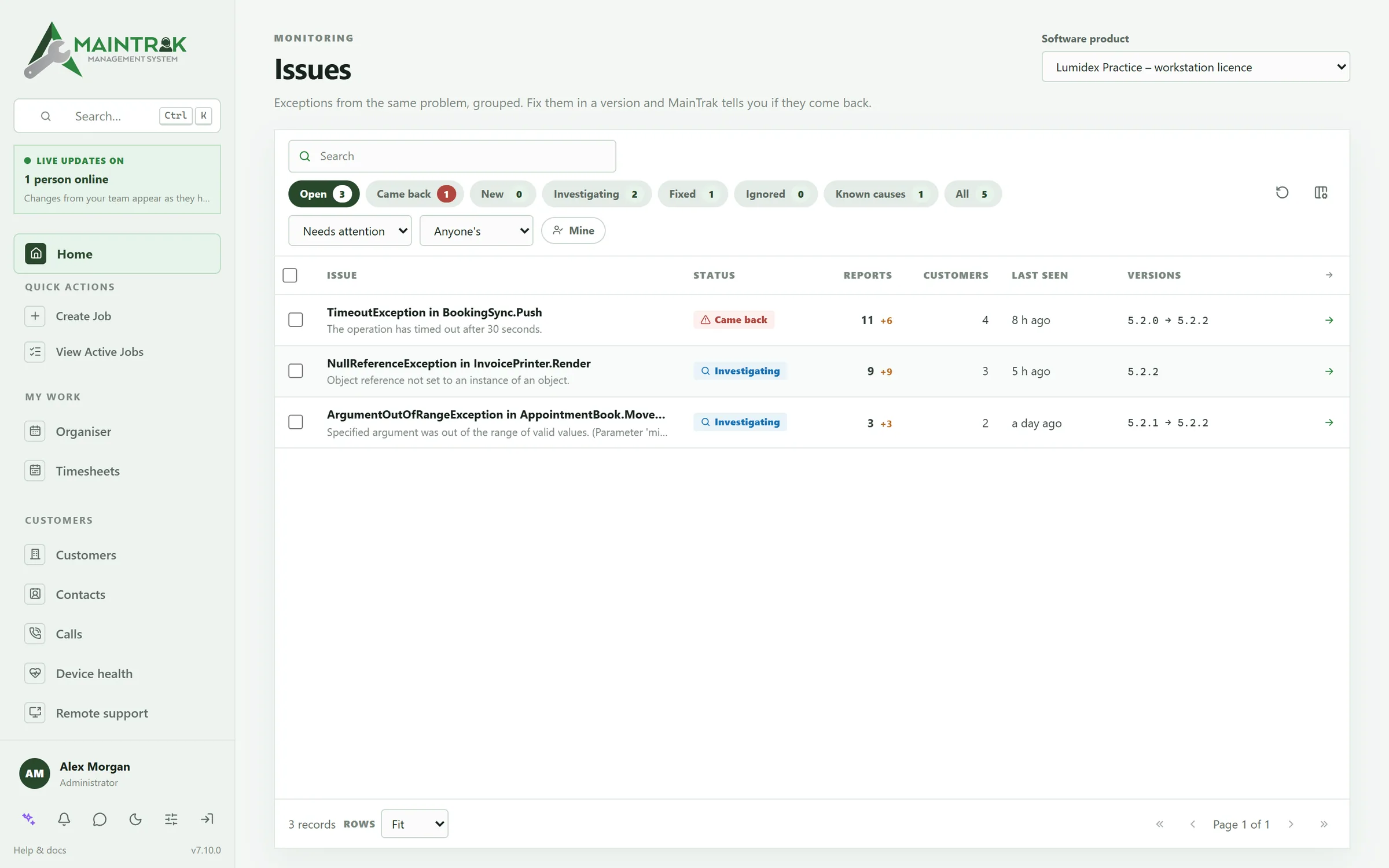
Your software posts its errors and updates to MainTrak's API. MainTrak groups the errors into issues, shows who's affected and which versions, and tells you when a fix has worked.
What's in it
Know which bugs matter, and when they're really fixed.
Errors grouped into issues
The same error from many customers becomes one issue, so you can see what's hurting most.
Tied to customers
Each issue shows which customers have it. Link it to their support jobs.
Fixed in a version
Mark an issue fixed in a version. If it shows up again in that version or later, you're told.
Confirmed fixed
Once everyone who had it has updated and it hasn't come back, the issue is confirmed fixed.
Suggest a fix
AI reads the error and the code it points to on GitHub, and suggests the cause and what to change.
Known causes
Tell MainTrak about errors that aren't bugs, like a network drive being offline, so they don't clutter the list.
Versions in use
Update reports tell MainTrak which version each PC runs, so you can see who's behind your latest release.
Uptime checks
Watch websites, APIs, certificates and DNS, and hear straight away when one goes down.
Heartbeats
Give a backup or scheduled job an address to call. If it stops calling, you're told.
A reporting API
Your software posts error reports and update reports to MainTrak, from any language. Example code for C#, PowerShell, Python and JavaScript gets you started.
GitHub if you like
Create or link a GitHub issue from MainTrak, or keep everything in MainTrak.
Licence checks
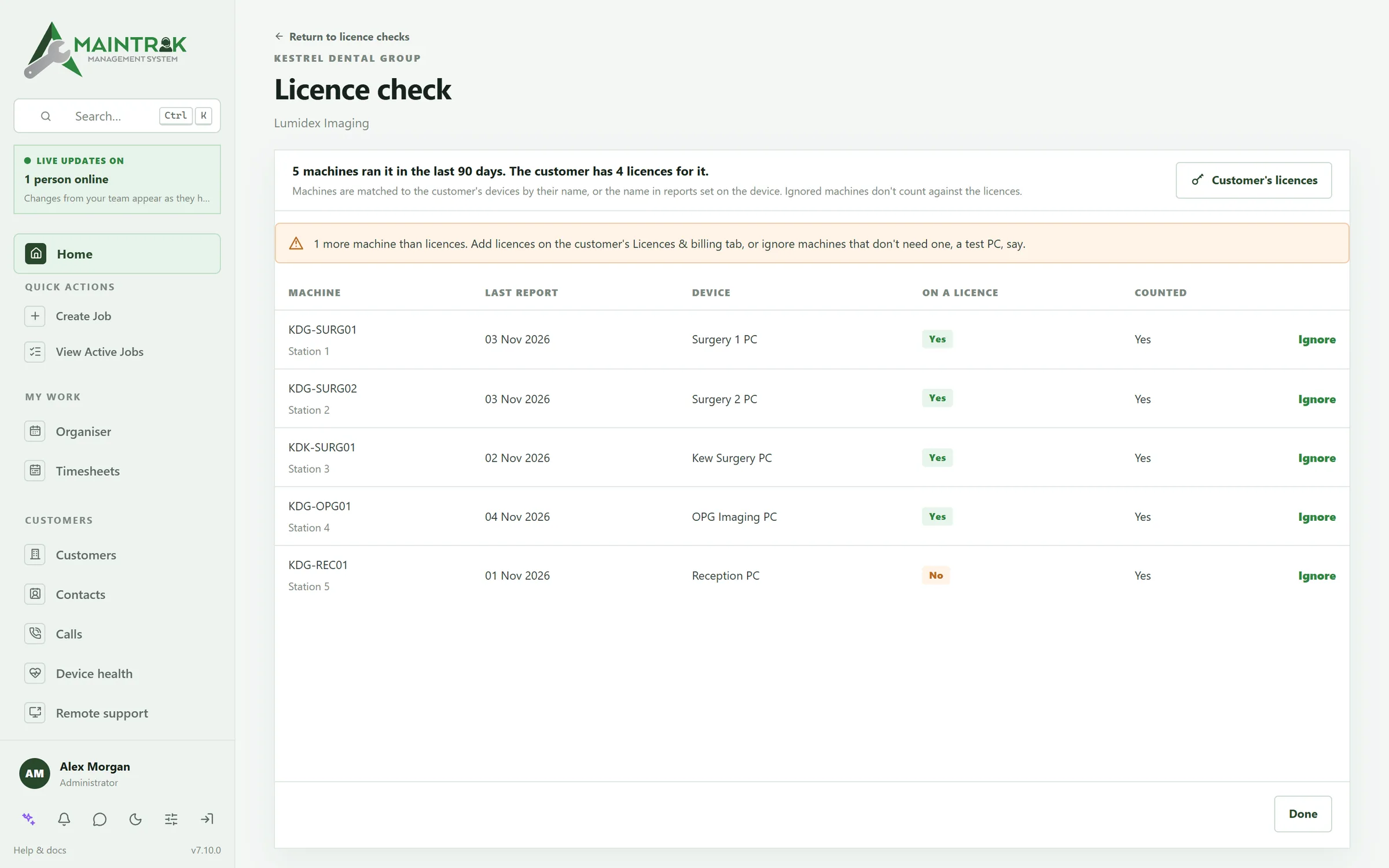
See who's using more licences than they pay for.
MainTrak counts the PCs that run your software, matches them to the customer's devices, and shows who's over.
FAQ
Questions about software monitoring.
How does our software send its errors?
Through MainTrak's reporting API. Your software posts an error report when something goes wrong, and an update report when it's installed or updated, using a reporting login. Error reports become issues, and update reports tell MainTrak which version each PC runs. Any language that can send a web request will do, and MainTrak has example code for C#, PowerShell, Python and JavaScript to start from.
Does it replace our error tracker?
For many teams, yes. MainTrak groups errors into issues, shows which customers have each one, and tells you when a fix has worked. It doesn't do performance tracing or session replays, so keep your current tool if you rely on those.
Our software runs in the cloud. Does MainTrak still fit?
Yes. Your web app and APIs can send their errors to MainTrak like any other program. Uptime checks watch your sites, and support plans and subscriptions are billed each month. Some features, like licence checks and remote support, matter most when your software runs on your customers' PCs. Use them only if they help.
Can MainTrak watch our websites and servers?
Yes. Uptime checks watch websites, APIs, ports, certificates and DNS, and tell you when something goes down. Heartbeat checks tell you when a scheduled job, like a backup, stops running. On Windows PCs and servers, the MainTrak Agent also watches drives, services, updates and antivirus.
More of MainTrak
Help desk
Emails, calls and portal requests become jobs, with SLAs, automations and a job sheet that shows everything.
Remote support
Connect to a customer's PC from the job, in your browser, encrypted end to end.
Billing
Support plans, licences, quotes and time, billed each month and sent to your accounting system.
Integrations
Your email, phone system, accounts, AI and your own software, connected.
Hosting and security
Hosted by us or on your own server, with two-factor sign-in, roles and an audit trail.
Try MainTrak
See it working on your own support jobs.
Tell us a little about your team and we'll get a trial ready with you.
- We set it up with you, so you're not left with an empty system
- Hosted by us, or on your own server
- We reply by email. No sales calls unless you ask
Rather talk now? Call +61 3 5221 2833 or email sales@acumensystems.com.au.