MainTrak for IT support and MSPs
Every client's PCs, calls and jobs, billed from the job.
For MSPs and IT teams that look after other people's computers. Emails and calls become jobs, the agent keeps an eye on every PC, you remote in from the device on the job, and support plans, licences and labour go to your accounting system, with Xero and MYOB built in.
Australian developed and supported · Real people, not a call centre · Hosted by us or by you
What it does for you
Built for the way IT support actually works.
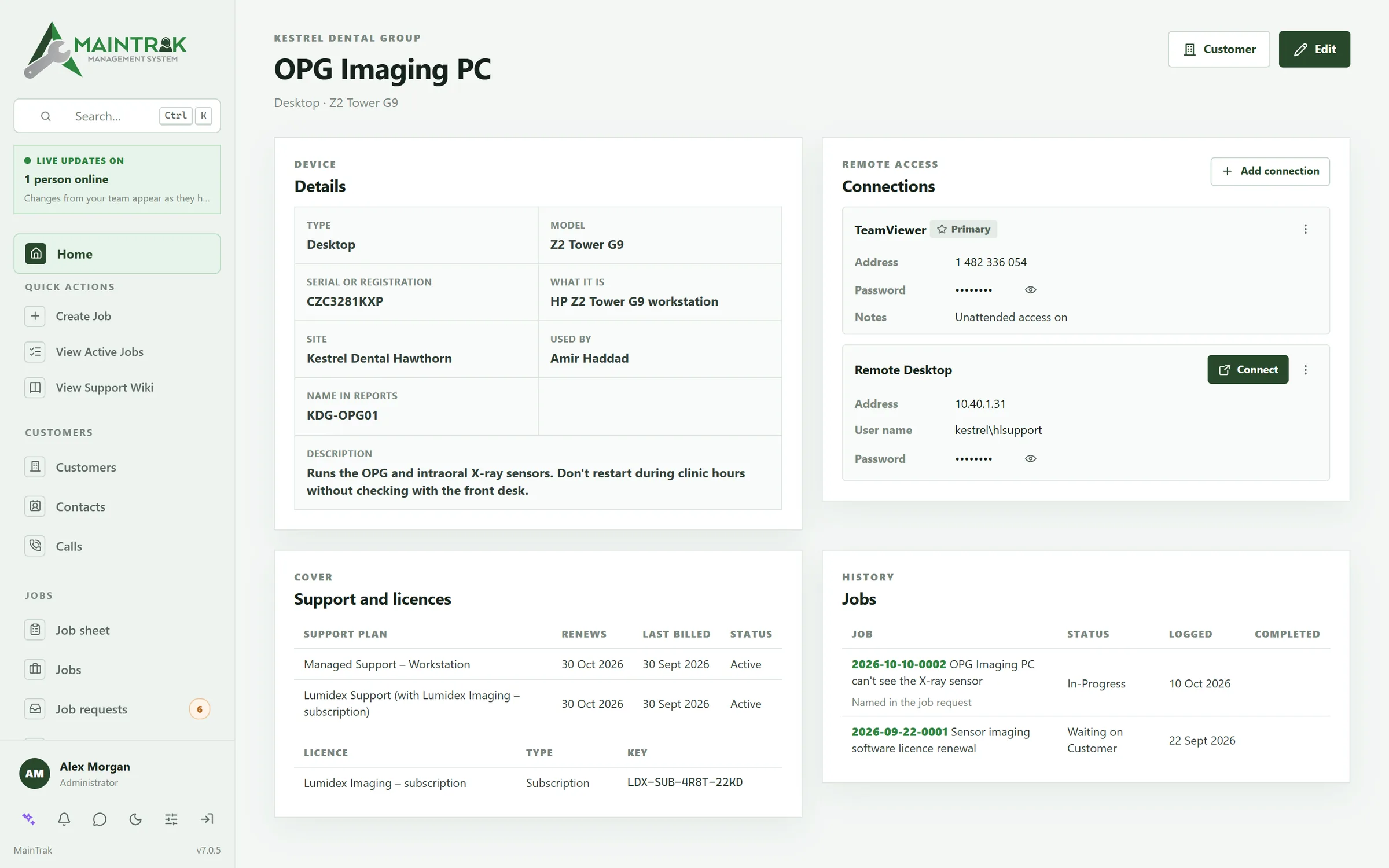
Clients, their sites, their PCs and their plans, all in one place, so the job, the remote session and the bill all come from the same record.
A job's journey
From “it's broken” to “it's billed”, without anyone chasing it.
Scroll to follow one printer fault, from the first email to the invoice.
01 · Arrives
Every request lands in MainTrak.
Emails become job requests. Calls are logged against the customer. Customers can also raise requests in your portal.
02 · Triaged
Junk is filtered out. New senders wait for you.
Newsletters, auto-replies and bounces are filtered out. Emails from people you don't know wait for you to check them. Work through the queue from the keyboard.
03 · Logged
A job, with the SLA clock running.
Jobs are numbered the way you like. The customer's SLA sets the deadlines, and the job shows how long is left.
04 · Routed
Automations do the busywork.
Simple rules send the job to the right team, email the customer and let your team know. Test a rule before you switch it on.
05 · Worked
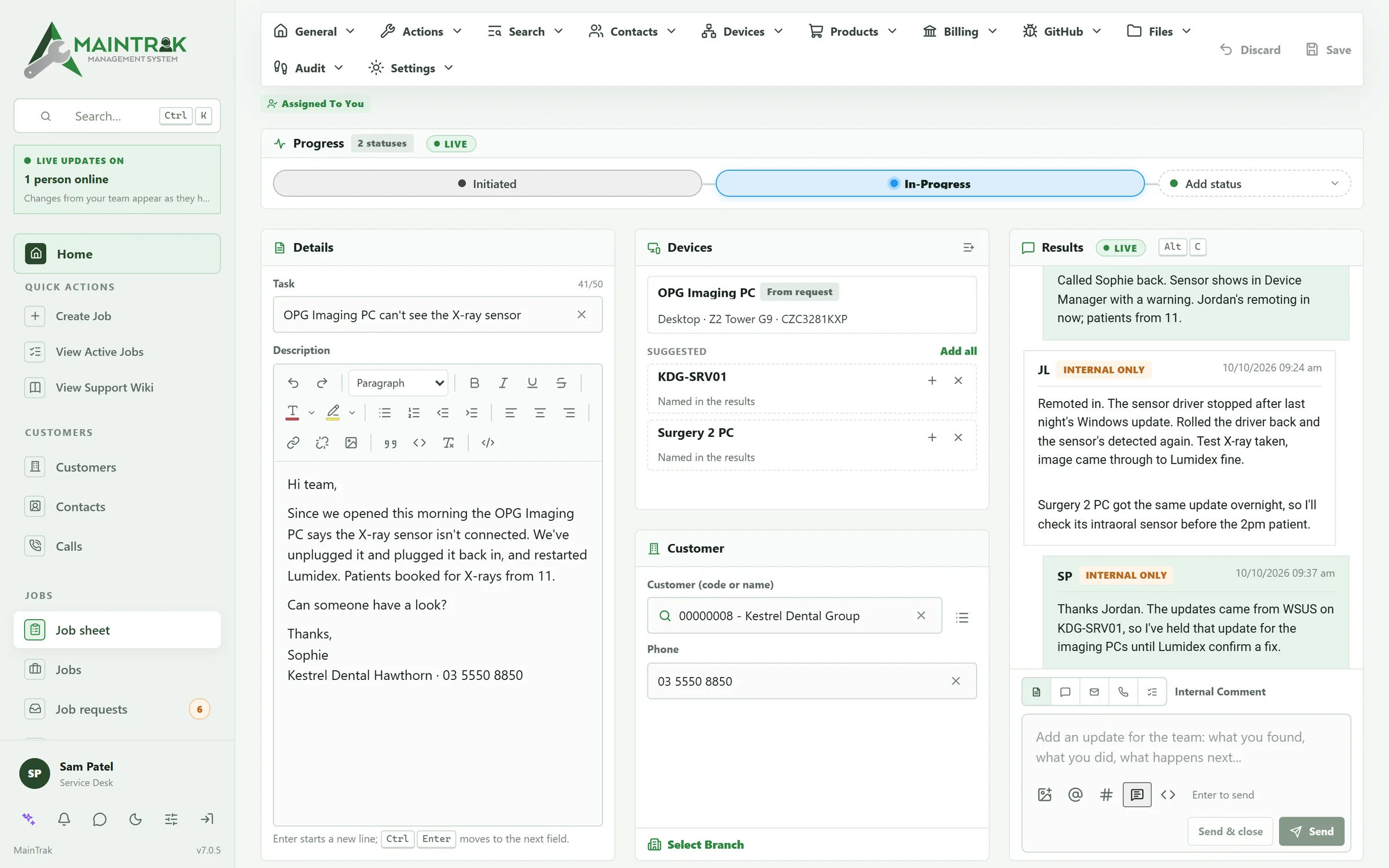
Everyone works on the same job, live.
Notes and @mentions show up straight away, and you can see who else has the job open. Customers reply from the portal, with photos.
06 · Billed
Charge for the work.
Parts and labour become charges. At month end, the invoices go to your accounting system. Every change is recorded.
What's inside
Everything a service desk uses all day, in one place.
Devices and assets
Know which device each job is about.
Keep every client's PCs, servers and equipment, with serials, sites, users and connection details. When an email names a device it goes on the job, and the job sheet suggests any others the job mentions.
Billing
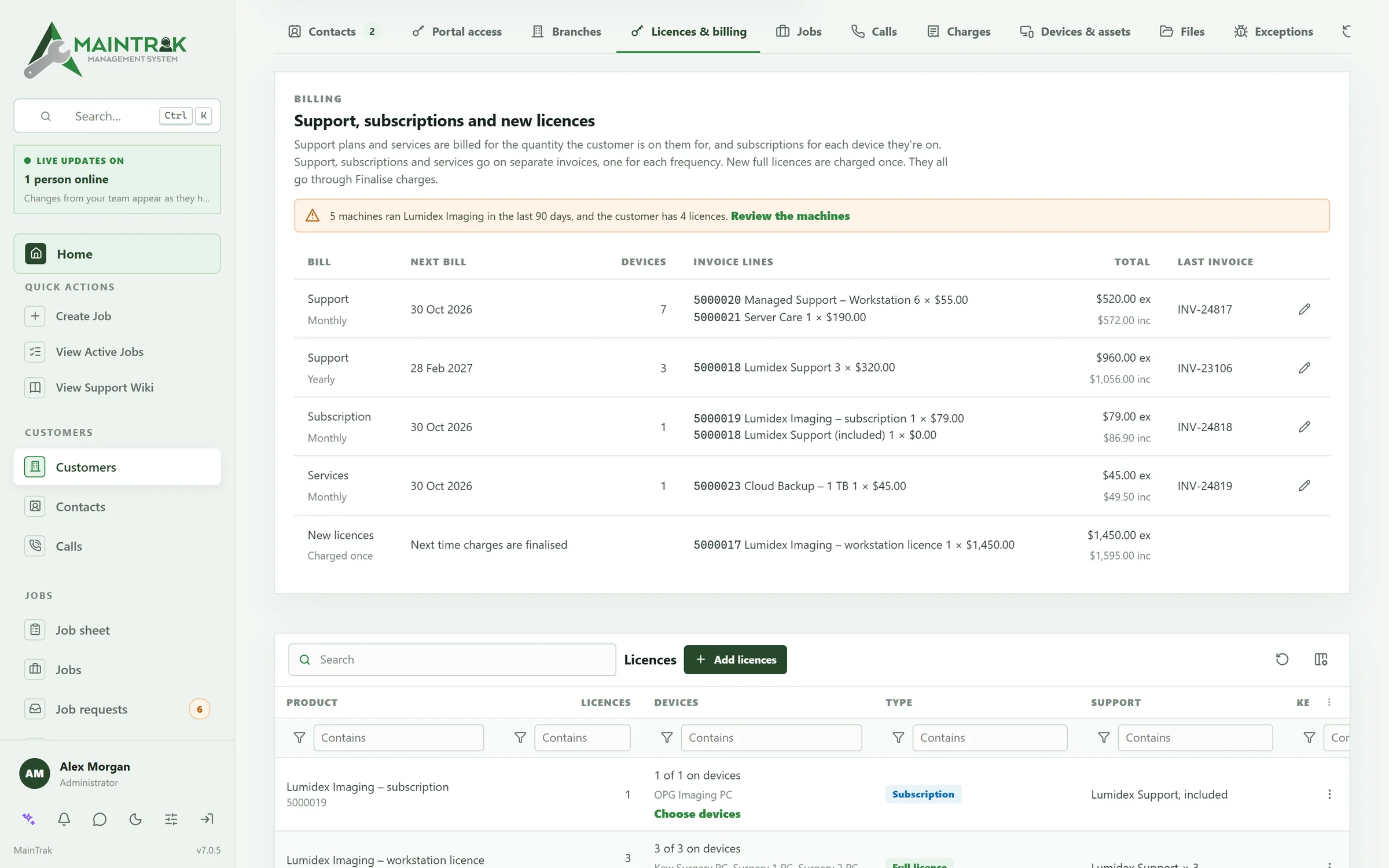
Bill the work, the plans and the licences, without a spreadsheet.
Labour and parts on a job become charges at each client's prices. Support plans, subscriptions and licences on devices bill at month end, each on its own bill. The invoices go straight to Xero or MYOB, or to your own accounting system.
Quotes
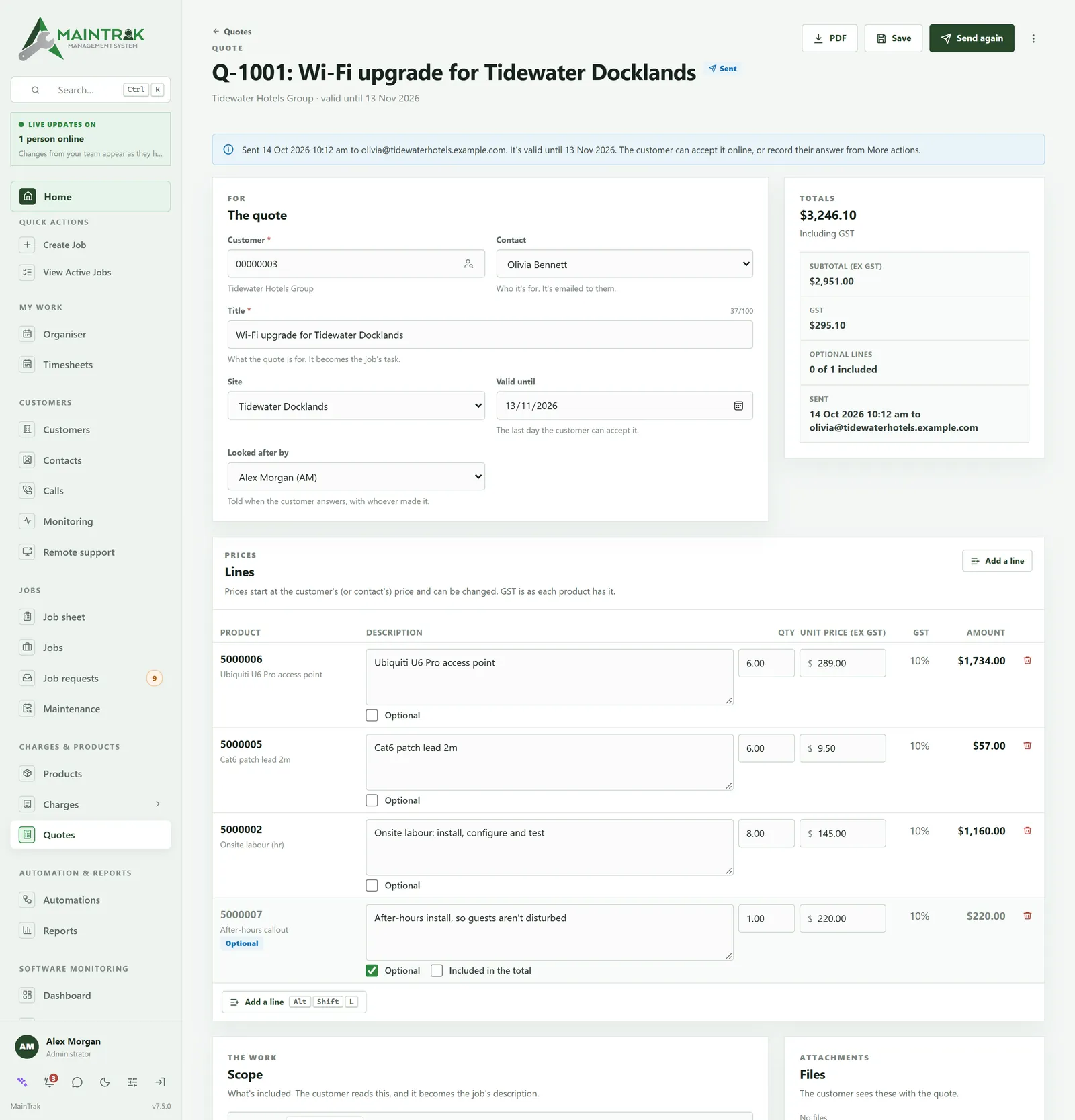
Quote it, have it accepted online, and the job's ready.
Build a quote from your products and labour, with optional extras. Clients accept and sign it online, and it becomes a job at the quoted prices, ready to charge.
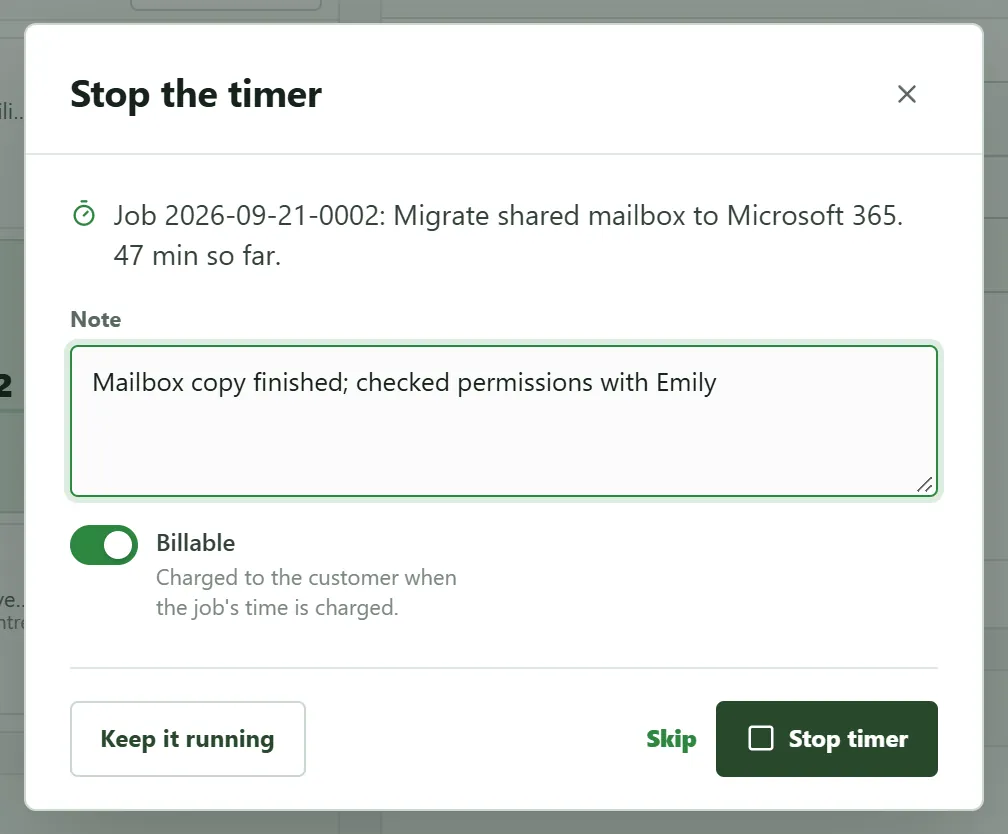
Time tracking
Time on every job, ready to bill.
Start a timer from the job, or add the time later. Each week's timesheet shows what's billable, and the time's ready on the job's next charge, as labour.
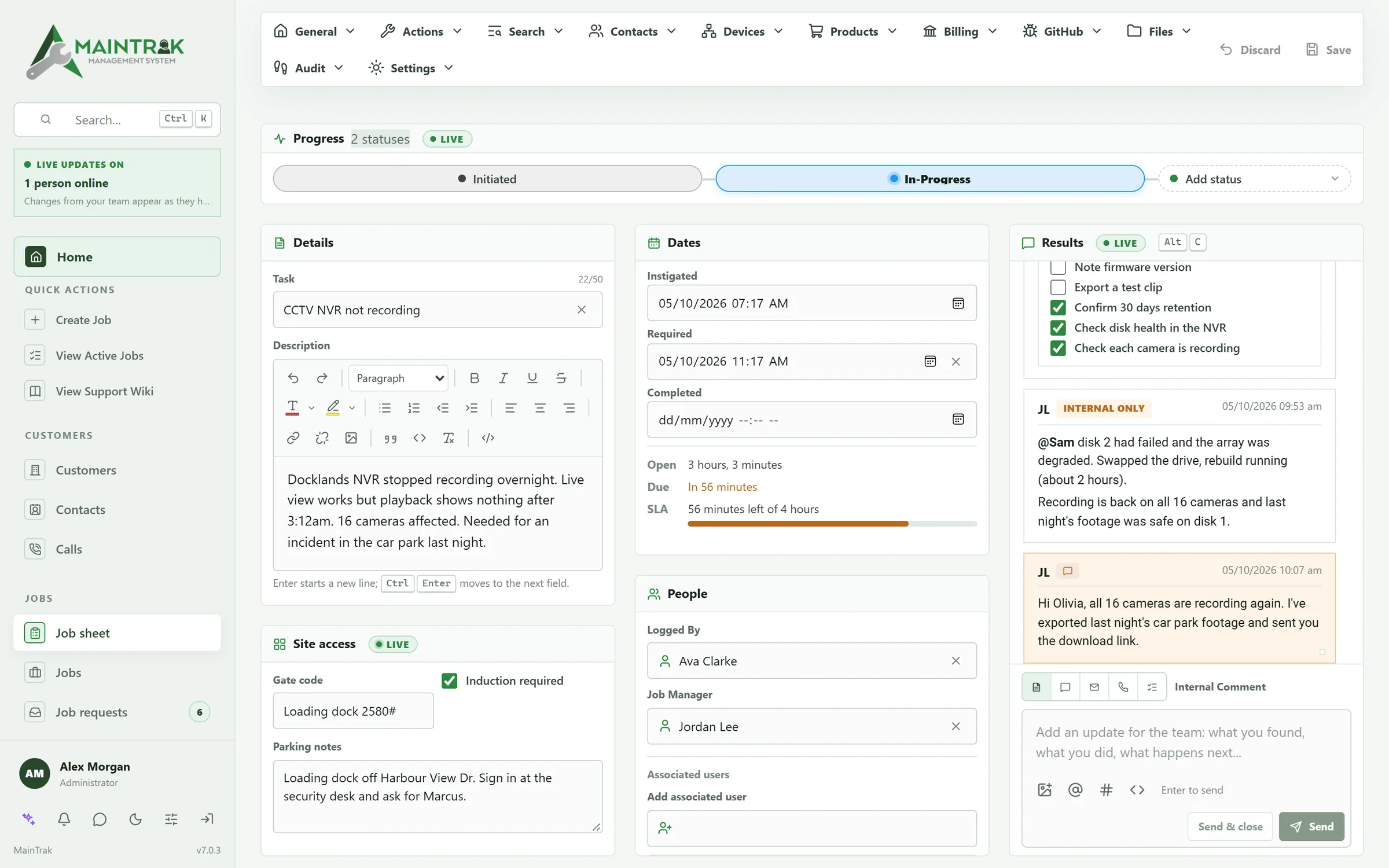
SLAs
See the deadline before it's missed.
Set response and resolution targets per client. Every job shows a live countdown, and alerts go out before a breach as well as after one.
Calls
Know who's calling before you answer.
Connect your phone system and a card slides in as your phone rings: the caller, their company, open jobs, last call and support plan. Start a job during the call, and the call goes on it when it ends.
Remote support
Remote support, built in.
See the error for yourself, check the install or walk them through it. Connect to a customer's PC from the job, in your browser. Sessions are encrypted end to end, and there's nothing to open on the firewall.
Ask to connect
Press Ask to connect. The person at the PC reads you a one-off password, or says no.
Unattended
Connect when nobody's there, using a password set on that PC. MainTrak never sees the password.
When they call you
They click the MainTrak icon by the clock, choose Remote support and read you a code.
PCs without the agent
Send them a link. They download MainTrak Support and read you a code. Nothing is installed.
- Works well over slow connections
- Copy files and text both ways
- Works with several screens
- Ctrl+Alt+Del, on PCs with the agent
- An app for iPad and iPhone
- See which PCs are online right now
- Restart the PC and reconnect when it's back
- The person at the PC sees you're connected, and can end it
Job 2026-10-12-0004 · Devices
In MainTrakKDG-RECEPTION OnlineUnattended
Kestrel Dental Group · Front desk · Windows 11 Pro
On Sophie's PC
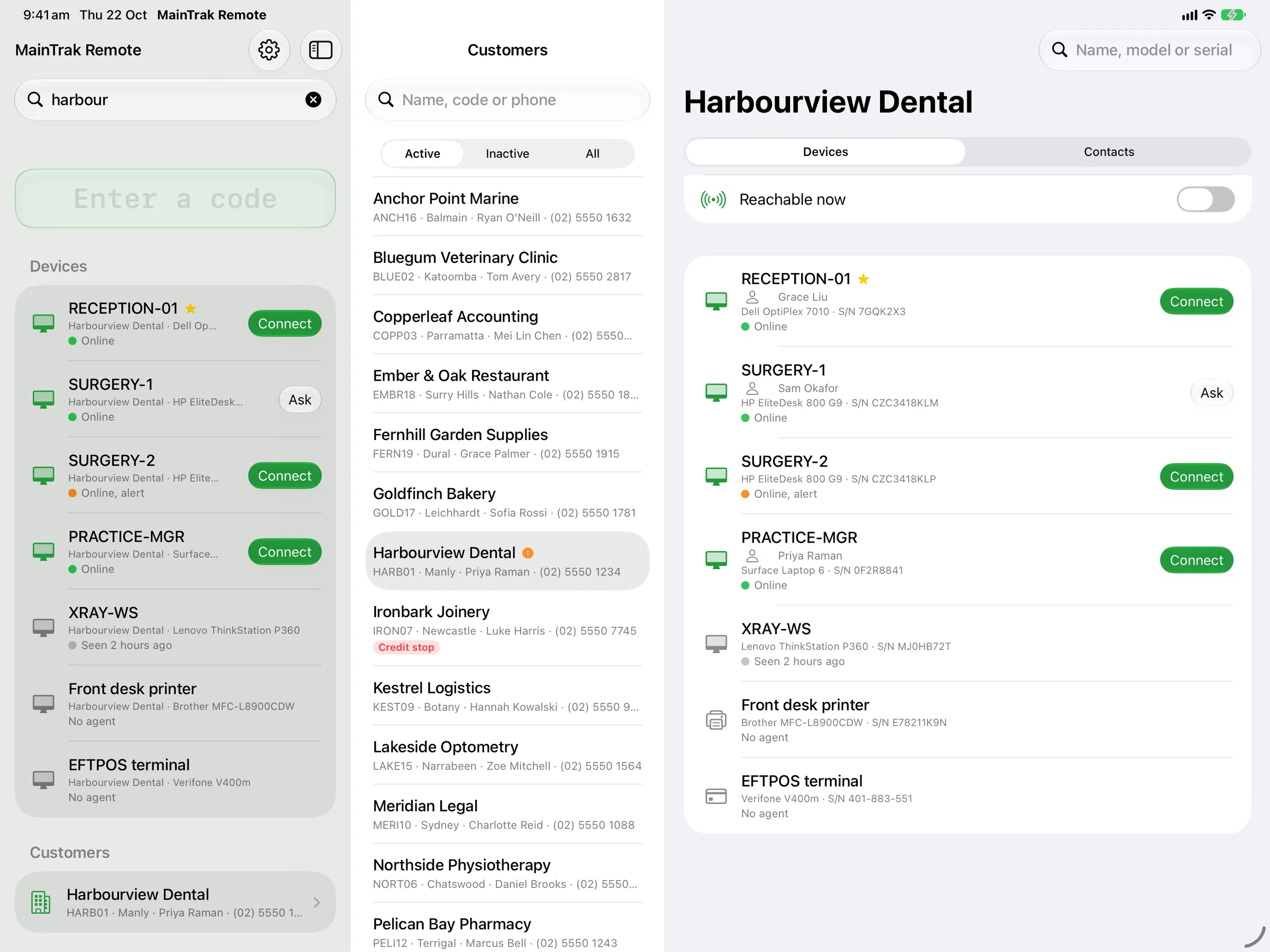
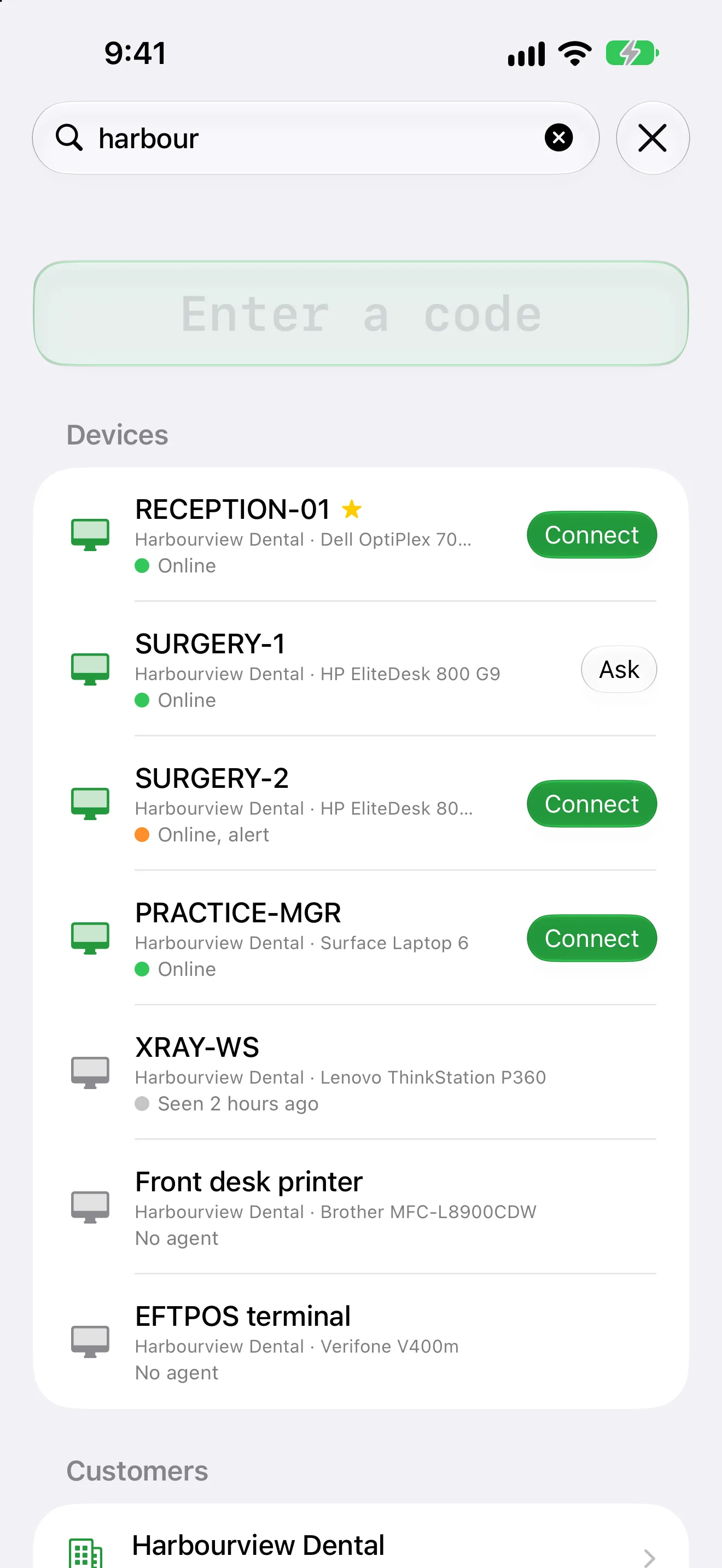
MainTrak Remote for iPad and iPhone
A customer calls. Find their PC and connect, from your iPad.
An app for remote support. Find the customer's PC, see if it's online, and connect. It uses the same sign-in and the same encryption as the browser.
- Find the PC by customer, device or the person calling
- See which PCs are online, and connect
- Use a keyboard, mouse, trackpad or Apple Pencil
- Or use touch, which works like a trackpad
- Show the PC on an external screen, or two PCs side by side
- Copy files and text, as in the browser
The MainTrak Agent for Windows
Keeps an eye on every PC, and can't do anything else.
A small program for Windows PCs and servers. It checks drives, services, updates and antivirus, and tells your MainTrak when something's wrong. People at the PC get an icon by the clock to ask for help.
Monitoring only
It can't run scripts or commands, and it only installs its own updates, signed by us. Even if someone broke into your MainTrak server, they couldn't use it to reach your customers' PCs.
Problems become jobs
A full drive, a stopped service, missing updates or antivirus turned off each raise a job request.
What's on each PC
Each PC's hardware, Windows version and installed programs, so you know what your software is running beside.
Updates itself
Try a new version of the agent on a few PCs first, then roll it out to everyone.
Easy to install
Email the customer a setup link, or read them a short code over the phone.
Integrations
Works with the tools you already use.
Connect your own software, email, accounts, phone system and more. If you need something that isn't here, ask us.
Your software
Your software posts error reports and update reports to MainTrak's API, with example code to start from. GitHub is optional.
Email and Outlook
Emails become job requests, and replies go to the right job. In Outlook, turn an email into a job. Contacts stay in step with Outlook or Google.
Accounting
Invoices and quotes go straight to Xero or MYOB. Use something else? Export the charges, or link it through MainTrak's API.
Phones
See who's calling as the phone rings, with their open jobs. Every call is logged against the customer. With some systems, click a number to call it.
Remote access
Already use a remote tool? Keep each PC's ID on its device and connect in a click.
AI
Use a cloud AI, or run one on your own server so your data stays with you.
Sign-in
Staff sign in with Google or Microsoft, and everyone can use two-factor codes.
Custom integrations
Automations can call other systems' web APIs and send webhooks. Need something else? We'll build it with you.
Data and hosting
Use the database your team knows. Import and export your data with CSV or Excel.
Hosting
Your cloud or ours.
Most support systems only run in someone else's cloud. With MainTrak you choose. It's the same product either way.
Hosted by us
We run MainTrak for you. Your team signs in from the browser, and there's no server to look after.
- Nothing to install
- Developed and supported in Australia
Hosted by you
Run MainTrak on your own server or cloud account, so your data stays with you. We send you the install and help you set it up.
- SQL Server or PostgreSQL
- AI on your own network, if you want it
For your IT team
Running it yourself takes one file.
One install file
A single Docker Compose file sets up MainTrak, the customer portal and HTTPS.
SQL Server or PostgreSQL
Use the database you already run. MainTrak updates its own tables when it starts.
Backups that move
Scheduled backups can be restored onto either database, so you're never stuck with one.
AI that stays home
Run AI on your own hardware with Ollama, and job data never leaves your network.
Your data, your rules
Customer records, jobs and files stay on servers you control.
Safe to test
On a test system, email safety mode holds outgoing mail, so customers never get test messages.
FAQ
Questions people ask us.
Do you host it, or do we?
Either. We can host it for you, so there's nothing to install. Or you can run it on your own server, on SQL Server or PostgreSQL. We send you the install and help you set it up.
Do we need Xero or MYOB?
No. If you use them, they're built in and invoices go straight there. If you use something else, finalise the month's charges with the invoice numbers from your own system, or export the charges to it. Your system can also read them through MainTrak's API, and we can build that link with you. We use our own accounting system ourselves.
Can we download MainTrak and try it?
There's no download, but you can try it. We set up a trial with you, hosted by us or on your own server. Setting MainTrak up still takes a few steps, so we'd rather do it with you than leave you with an empty system and a guide.
Do we have to talk to sales?
No. We'll reply by email unless you ask for a call. Either way, you deal with the people who make MainTrak.
How do customers send us work?
By email, by phone or through your customer portal. Emails become job requests, and replies go to the right job. Calls are logged against the customer. Customers can also raise requests in the portal if you turn that on.
Is remote support secure?
Yes. Sessions are encrypted end to end, so even the MainTrak server can't see the screen. Nobody connects without the PC's say-so: the person there agrees, or you use a password that was set on that PC. They can see when you're connected, and end it. The MainTrak Agent can't run scripts or commands, so it can't be used to push anything to customers' PCs.
Do customers need the agent for remote support?
No. Without it, they download MainTrak Support, open it and read you a code. Nothing is installed. The agent adds unattended access, Ctrl+Alt+Del and health checks.
Can we remote in from an iPad or iPhone?
Yes, with the MainTrak Remote app. Find the PC by customer, device or caller, and connect. It works with a keyboard, mouse, trackpad or Apple Pencil, or with touch.
Can MainTrak watch our websites and servers?
Yes. Uptime checks watch websites, APIs, ports, certificates and DNS, and tell you when something goes down. Heartbeat checks tell you when a scheduled job, like a backup, stops running. On Windows PCs and servers, the MainTrak Agent also watches drives, services, updates and antivirus.
Which phone systems work with MainTrak?
3CX, Yeastar, RingCentral, Zoom Phone and Aircall. With each one, you see who's calling as the phone rings, and the call is logged when it ends. With 3CX, Yeastar and Aircall you can also click a number in MainTrak to call it. On 3CX, that needs Call Control, on the AI edition.
Can MainTrak connect to our other systems?
Yes. It works with Microsoft 365, Gmail, Outlook, Xero, MYOB, phone systems, GitHub and the main AI services. Automations can call other systems' web APIs too. If you need something else, we can build it with you.
Can we bring our existing data?
Yes. Import customers, contacts, products, calls and jobs from CSV or Excel. A wizard matches your columns to MainTrak's. You can export your data again at any time.
Does it work on phones and tablets?
Yes, in the browser. On a phone, lists turn into cards and the job sheet fits under your thumb. There are also iPhone and iPad apps for staff chat and remote support.
How secure is it?
Staff and customers can sign in with two-factor codes, and staff can sign in with Google or Microsoft. Roles decide what each person can do, teams decide who sees which jobs, and every change is recorded.
How much does it cost?
It depends on the size of your team and whether we host it or you do. Tell us about your team and we'll send you a price.
Who do we talk to when we need help?
Our support team in Australia. They use MainTrak every day, and you can talk to the developers who build it when you need to.
Who's behind MainTrak?
Acumen Computer Systems, an Australian software company. We built MainTrak to run our own support, and we still use it every day.
Pricing
Priced on your team size and how you host it.
Tell us how many people will use MainTrak and whether you'd like us to host it, and we'll send you a quote.
Your quote depends on two things:
Team size
How many people will use MainTrak.
Hosting
Whether we host it for you, or you run it on your own server.
Try MainTrak
See it working on your own support jobs.
Tell us a little about your team and we'll get a trial ready with you.
- We set it up with you, so you're not left with an empty system
- Hosted by us, or on your own server
- We reply by email. No sales calls unless you ask
Rather talk now? Call +61 3 5221 2833 or email sales@acumensystems.com.au.