Help desk
Every request in one place. Nothing missed.
Emails, calls and portal requests become jobs. Each one has a deadline, an owner and the customer's details, so your team can get on with it.
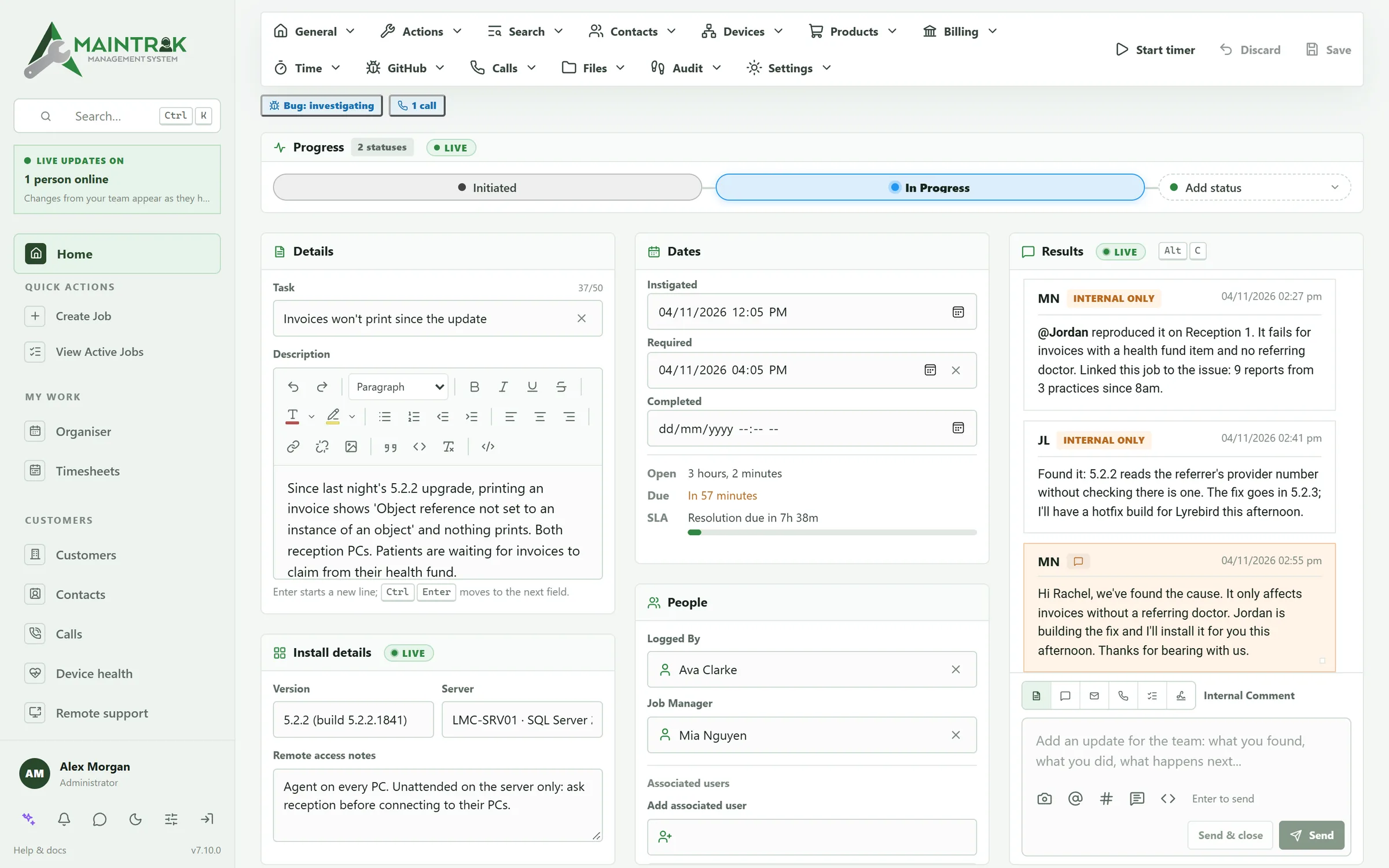
A closer look
The parts your team uses all day.
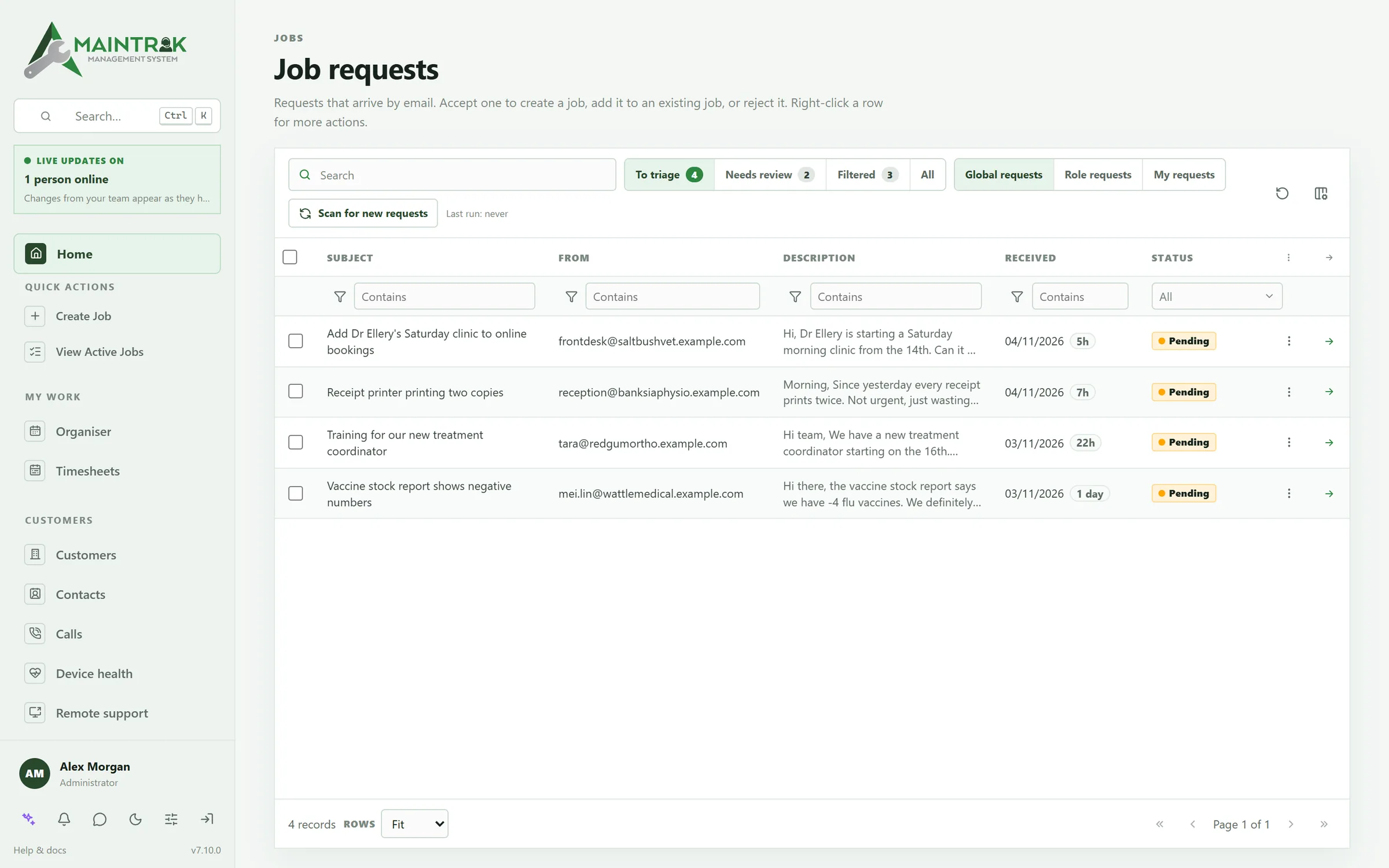
Email to job
Emails become jobs, and junk stays out.
Connect Microsoft 365, Gmail or any mailbox. New emails wait to be sorted, new senders wait for you to check them, and junk is filtered out. Replies go to the right job.
SLAs
See the deadline before it's missed.
Set response and fix times for each customer. Every job counts down, and you're warned before a deadline passes.
Calls
Know who's calling before you answer.
Connect your phone system and a card appears as the phone rings, with the caller, their open jobs and their support plan. The call is logged when it ends.
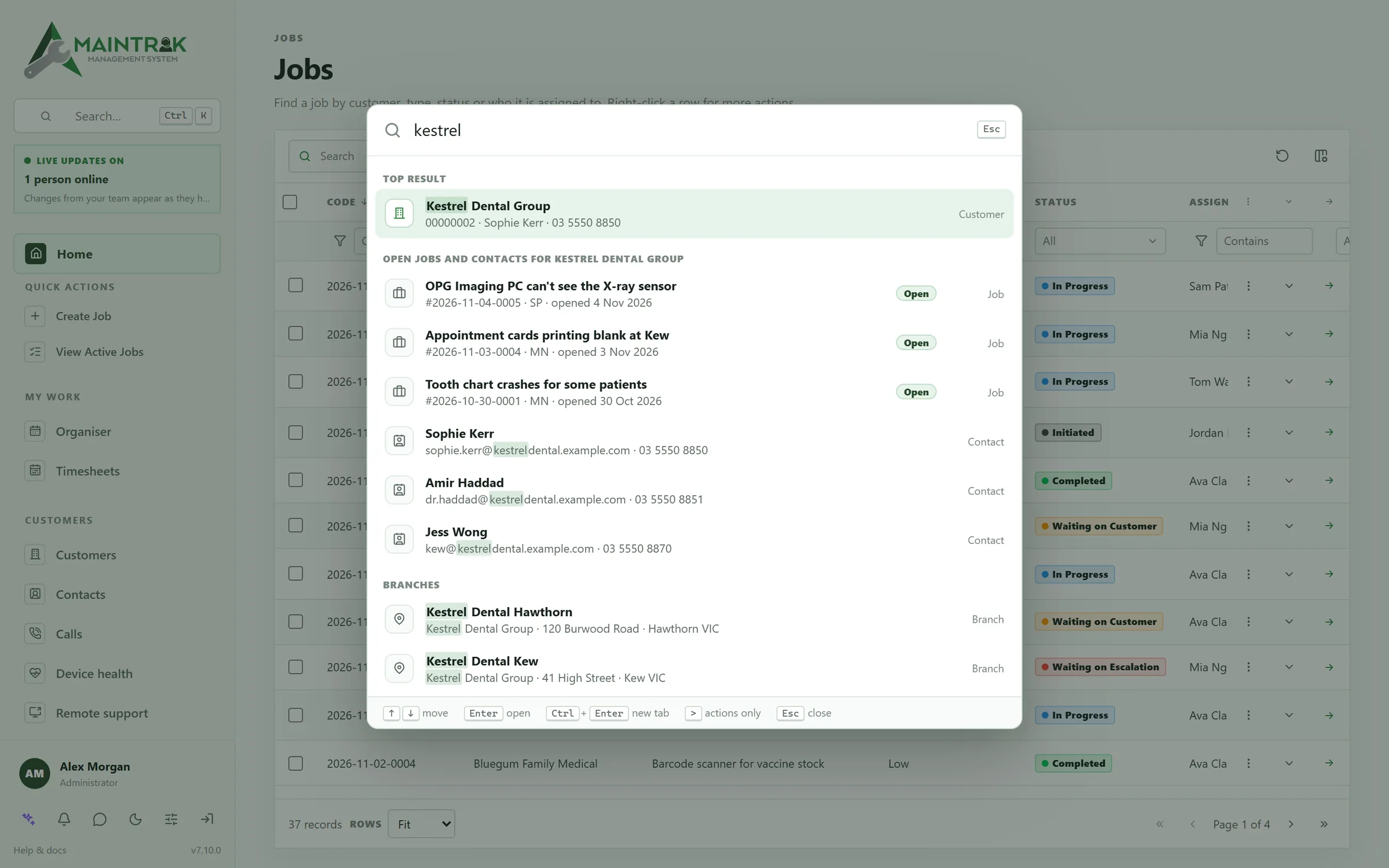
Search
Find anything with Ctrl+K.
One search box finds customers, jobs, contacts, PCs and settings. Most things also have a keyboard shortcut.
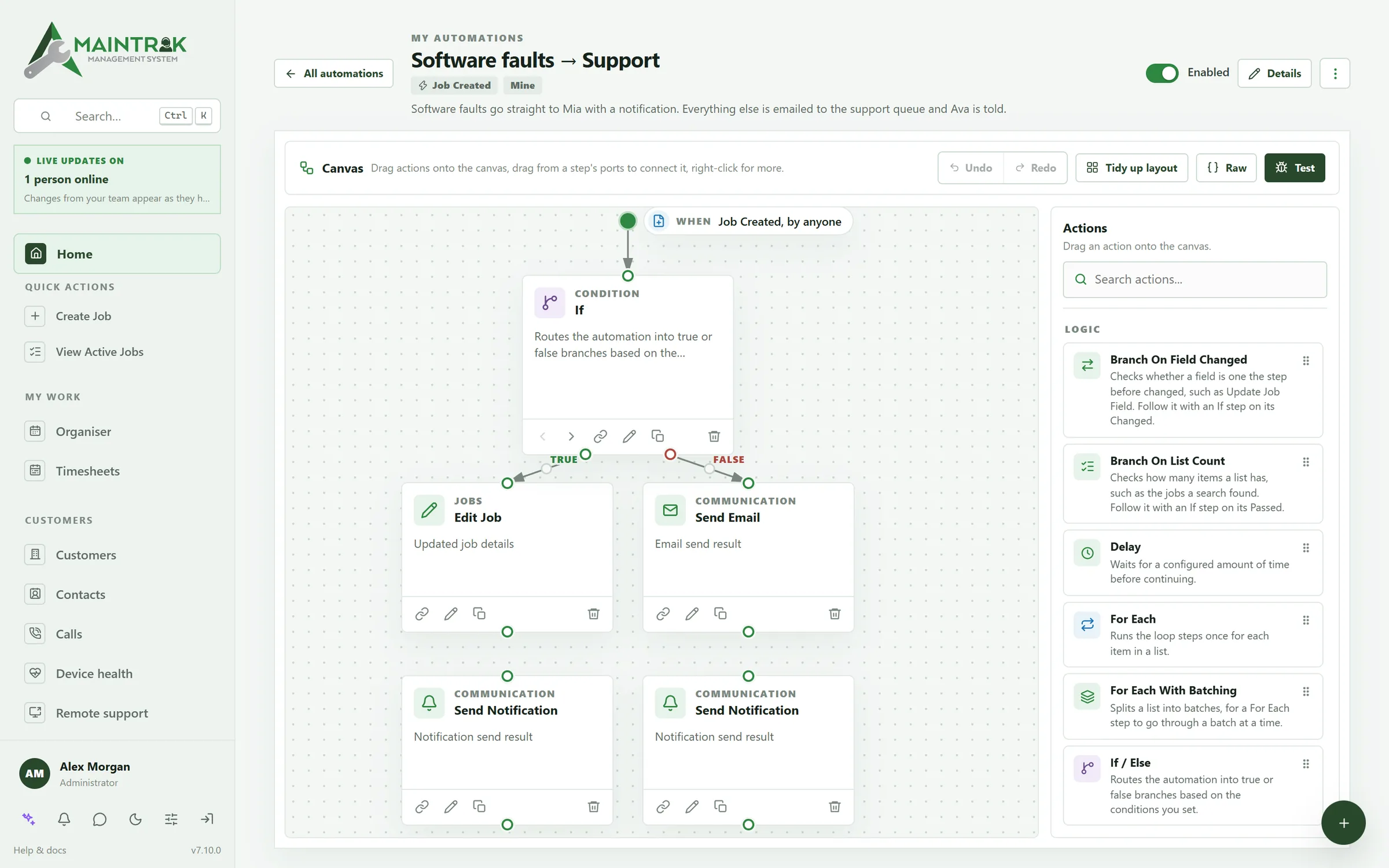
Automations
Rules you can read, and test first.
Start from a ready-made rule or build your own. Send jobs to the right person, email customers and chase replies. Test a rule before you switch it on.
AI, if you want it
Ask the assistant to do it.
Ask it to log a job, add a charge or draft a reply. Use a cloud AI, or run one on your own server so nothing leaves your network. Or don't use AI at all.
Also in the help desk
The small things that save time.
Customer portal
Customers follow their jobs, reply with screenshots and accept quotes, in your brand.
Your own help centre
Guides for your product. MainTrak suggests them when a customer asks for help.
Spots duplicates
When a request looks like a job you already have, MainTrak points it out.
Quick replies
Save answers you give often, and use them again in emails and notes.
Customer ratings
Customers rate finished jobs, and a poor rating goes to a manager.
Outlook add-in
Turn an email into a job, or add it to one, without leaving Outlook.
Calendar feeds
Due dates show up in Outlook, Google or your phone's calendar.
Staff chat
Chat with your team, share files and link to a job by typing #.
Reports
Build reports and download them as PDF or CSV, or have them emailed every month.
Make it yours
Your fields, your layout, your way of working.
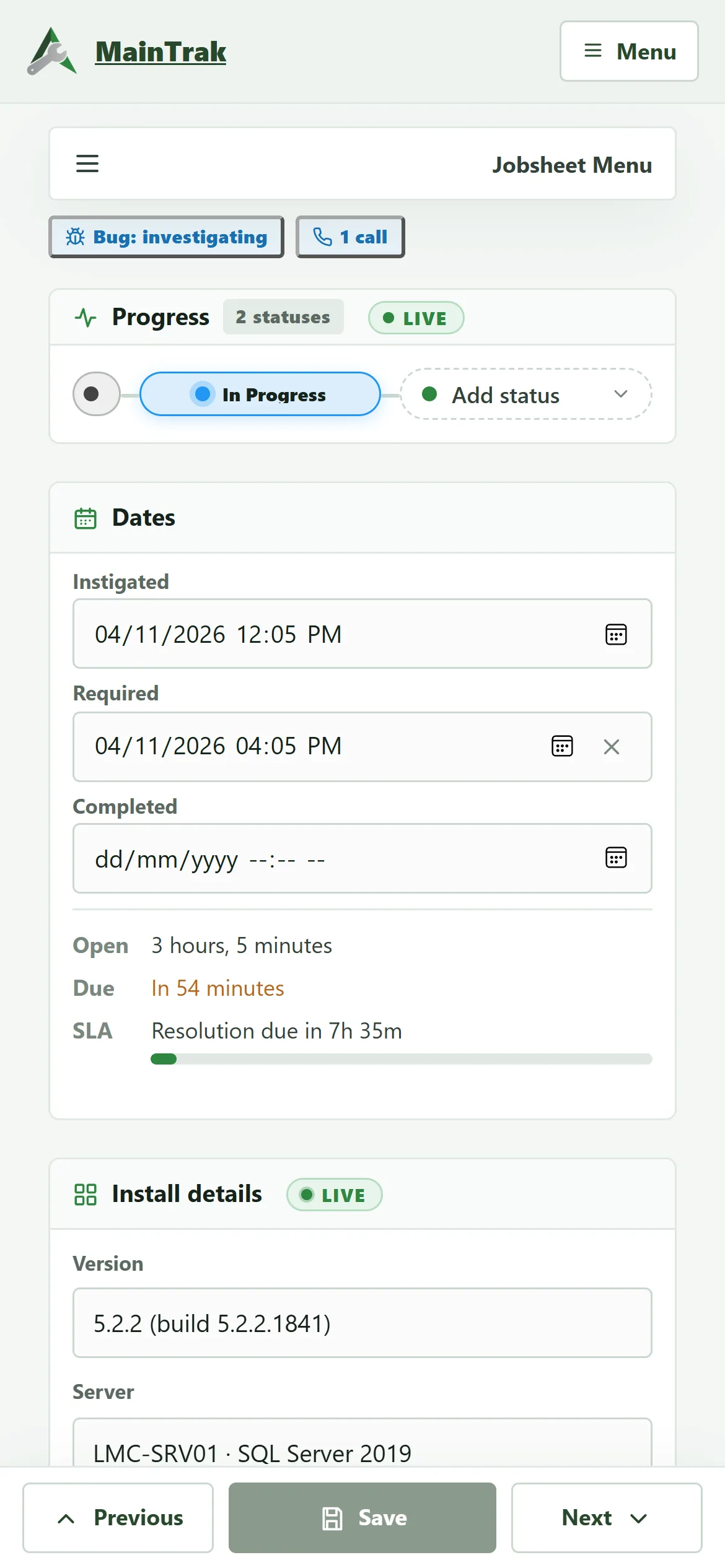
Add the fields you need, lay out the job sheet your way, and change how your portal looks. You don't need a developer.
Custom fields and layouts
A job sheet that holds what your team needs, where they expect it.
- Add your own fields, like a version number or server name.
- Put them on cards, next to the built-in ones.
- Drag and resize cards to suit how you work.
- Use separate layouts for tablets and desktops.
- Set your own job types, statuses, priorities and checklists.
Job sheet layout
Results
People
Dates
SLA
Site access
Charges
Portal name
Brand colour
Font
Corners
Top bar
Mode
Job numbers that mean something
Use running numbers, dates, a prefix, or all three.
Next job
HS-2026-1005-0042
The running number starts again each day.
Dashboards
Choose from 21 widgets, like charts, open jobs, calls and your calendar.
Sidebar and quick actions
Reorder the menu, hide what you don't use, and pin the actions you use most.
Email templates
Every email MainTrak sends uses a template you can edit, so it sounds like you.
Plugins
Add your own pages and cards with plugins, which only get the access you approve.
Desktop, tablet and phone
Works on your desk, your tablet and your phone.
MainTrak runs in the browser on any screen. On a phone, lists turn into cards and the buttons sit under your thumb. Tablets get a job sheet layout of their own.
- Staff chat, with files and links to jobs
- MainTrak Chat for iPhone, with notifications
- MainTrak Remote for iPad and iPhone, to connect to customers' PCs
- Light and dark themes
Sam Patel
Online
Bluegum just rang, invoices won't print there either. Same as Lyrebird?
8:52 am
Yep, same error. It's one issue in Monitoring now, 3 practices.
8:55 am
Nice. Can you do Lyrebird first? They're Premium. #2026-11-04-0004
9:04 am
On it. Jordan's hotfix is building now.
Sent 9:06 am
FAQ
Questions about the help desk.
How do customers send us work?
By email, by phone or through your customer portal. Emails become job requests, and replies go to the right job. Calls are logged against the customer. Customers can also raise requests in the portal if you turn that on.
Which phone systems work with MainTrak?
3CX, Yeastar, RingCentral, Zoom Phone and Aircall. With each one, you see who's calling as the phone rings, and the call is logged when it ends. With 3CX, Yeastar and Aircall you can also click a number in MainTrak to call it. On 3CX, that needs Call Control, on the AI edition.
Do we have to use AI?
No. Everything works without it. If you want it, connect OpenAI, Claude, Gemini or a similar service. Or run a free model on your own server with Ollama, so nothing leaves your network.
Does it work on phones and tablets?
Yes, in the browser. On a phone, lists turn into cards and the job sheet fits under your thumb. There are also iPhone and iPad apps for staff chat and remote support.
Can we bring our existing data?
Yes. Import customers, contacts, products, calls and jobs from CSV or Excel. A wizard matches your columns to MainTrak's. You can export your data again at any time.
More of MainTrak
Software monitoring
Your software's errors grouped into issues, with the customers and versions they affect.
Remote support
Connect to a customer's PC from the job, in your browser, encrypted end to end.
Billing
Support plans, licences, quotes and time, billed each month and sent to your accounting system.
Integrations
Your email, phone system, accounts, AI and your own software, connected.
Hosting and security
Hosted by us or on your own server, with two-factor sign-in, roles and an audit trail.
Try MainTrak
See it working on your own support jobs.
Tell us a little about your team and we'll get a trial ready with you.
- We set it up with you, so you're not left with an empty system
- Hosted by us, or on your own server
- We reply by email. No sales calls unless you ask
Rather talk now? Call +61 3 5221 2833 or email sales@acumensystems.com.au.