Every customer, every version, on track.
The support desk for software companies. Customer emails, calls and your software's errors all land in one place, next to each customer's version and support plan. Fix the right things first, and bill for your time.
Built by a software company · Australian developed and supported · Hosted by us or by you
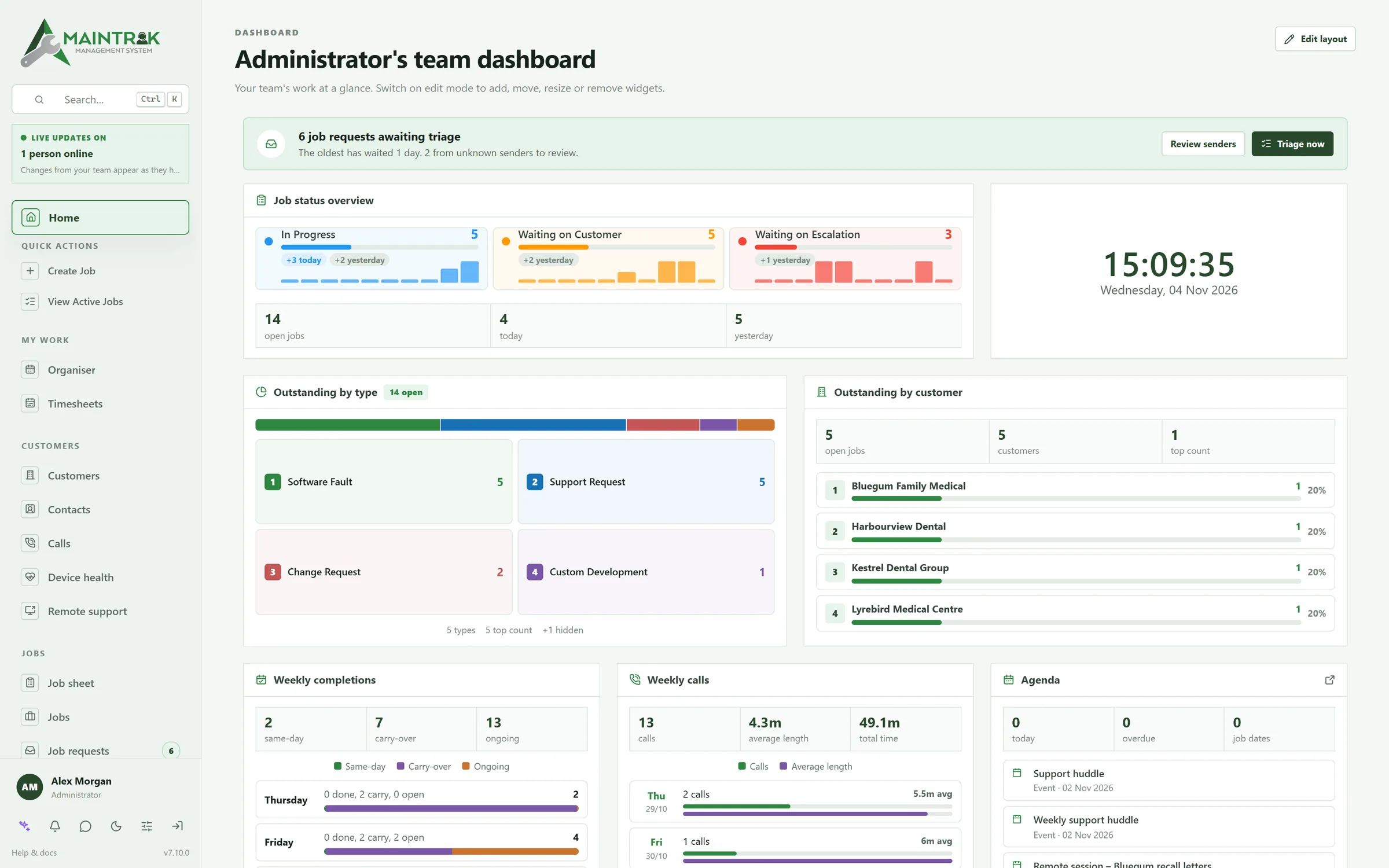
Built by a software company, for software companies.
- Errors grouped into issues
- Fixed in a version, confirmed fixed
- Suggest a fix with AI
- Versions in use
- Licence checks
- Uptime monitors and heartbeats
- Email to job
- Phone system integration
- SLA timers
- Branded customer portal
- Your product's help centre
- Support plans and subscriptions
- Licences billed monthly
- Xero and MYOB
- Quotes signed online
- Timesheets
- Remote support built in
- PC health monitoring
- Visual automations
- GitHub
- Bring your own AI
- Outlook add-in
- Staff chat
- SQL Server or PostgreSQL
- Hosted by us or by you
Why MainTrak
Your help desk doesn't know their version. Your error tracker doesn't know who they are.
Most software companies use five or six tools for support, and someone copies between them. MainTrak puts it all in one place.
Help desk
Your help desk has the email, but not the error behind it.
Each job links to the error, the PC and the customer's plan.
Learn moreSoftware monitoring
Your error tracker has the error, but not who the customer is.
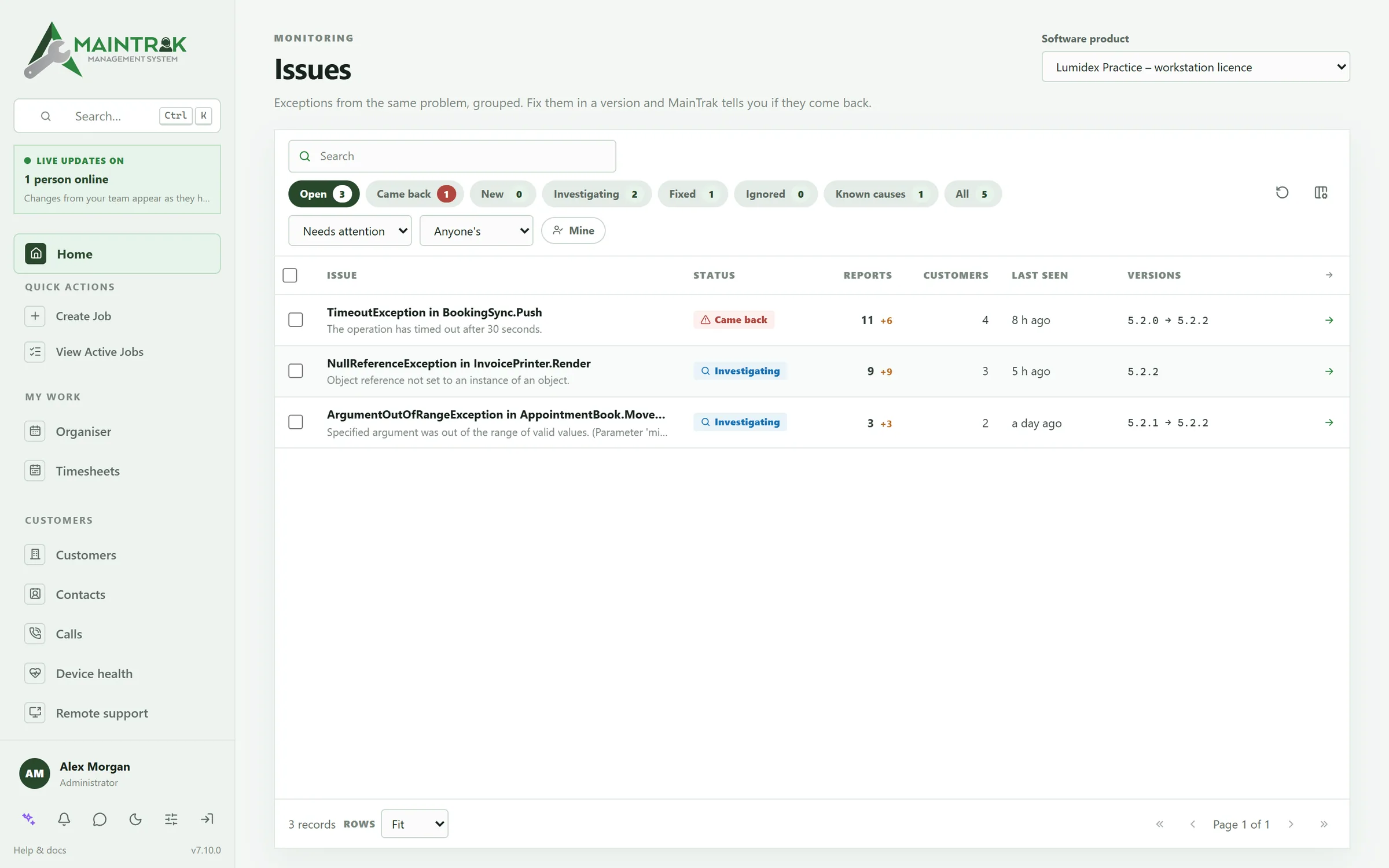
Errors are grouped, and linked to the customers who have them.
Learn moreRemote support
Your remote access tool is another subscription, with its own list of PCs.
Remote support is built in. Connect from the job.
Learn moreBilling
Your accounts system gets support plans and labour typed in again every month.
Plans, licences and time go straight to your accounts, whether that's Xero, MYOB or your own system.
Learn moreIntegrations
Your phone system knows the number, but not the customer.
See the caller's open jobs as the phone rings, and the call is logged for you.
Learn moreHosting and security
Most support systems only run in someone else's cloud.
We host it for you, or you run it on your own server.
Learn moreA job's journey
From “it broke after the update” to “fixed, and billed”.
Scroll to follow one bug, from the customer's email to the invoice.
01 · Arrives
The customer emails. Their PC has already sent the error.
Emails to your support address become job requests. Calls are logged against the customer. And your software sends its own errors, so you often know before they call.
02 · Logged
A job, with the SLA clock running.
MainTrak numbers the job and starts the clock from the customer's SLA. The PC from the email goes on the job, so you can connect to it.
03 · Routed
Automations do the busywork.
Simple rules send the job to the right person, email the customer and let your team know. Test a rule before you switch it on.
04 · Linked
One issue, every customer who has it.
Errors from the same bug are grouped into one issue. You see which customers have it, and which versions it's in. Link the job, and MainTrak suggests other jobs with the same problem.
05 · Fixed
Fixed, then confirmed fixed.
AI suggests the cause from the error and your code. Mark the issue fixed in 5.2.3. Once everyone has updated and it hasn't come back, it's confirmed fixed. If it does come back, you're told.
06 · Billed
Charge for the work.
The time on the job is ready to charge. Support plans and licences are billed each month, and the invoices go to your accounting system.
For software companies
We're a software company too.
Acumen makes and supports business software in Australia. We built MainTrak to run our own support: our customers, the versions they're on, and the errors our software hits.
It works the same way for your software, whether it's installed on your customers' PCs or runs in the cloud.
More about software monitoringVersions in use
See which version each customer runs, and who's behind your latest release.
Licences, checked
Count the PCs your software is on, and compare them with what each customer pays for.
A reporting API
Your software posts its errors and updates to MainTrak, from any language. We give you example code to start from.
Support
Real people who know MainTrak, here in Australia.
When you need help, you talk to people who use MainTrak every day, and to the developers when you need to.
Support based in Australia
You'll reach our team in Australia: real people, not a chatbot or an overseas call centre.
Straight to the developers
When a question needs it, you can talk directly with the developers who build MainTrak.
Talk to us on +61 3 5221 2833 or sales@acumensystems.com.au.
Not a software company?
MainTrak runs IT support and facilities teams too.
It's built for software companies, because we are one. But IT support and facilities teams use it too, and each has a page of its own.
IT support teams and MSPs
For teams that look after other people's computers, including internal IT.
- The MainTrak Agent watches each Windows PC and raises a job when something's wrong
- Connect to a PC from the job, with someone there or unattended
- Bill support plans and licences for each device
Facilities and maintenance teams
For teams that look after buildings, plant and equipment.
- Routine jobs raised before they're due
- Checklists on site, and the customer signs the job off
- Sites, equipment and a record of every visit
FAQ
Questions people ask us.
Our software runs in the cloud. Does MainTrak still fit?
Yes. Your web app and APIs can send their errors to MainTrak like any other program. Uptime checks watch your sites, and support plans and subscriptions are billed each month. Some features, like licence checks and remote support, matter most when your software runs on your customers' PCs. Use them only if they help.
Does it replace our error tracker?
For many teams, yes. MainTrak groups errors into issues, shows which customers have each one, and tells you when a fix has worked. It doesn't do performance tracing or session replays, so keep your current tool if you rely on those.
Can we download MainTrak and try it?
There's no download, but you can try it. We set up a trial with you, hosted by us or on your own server. Setting MainTrak up still takes a few steps, so we'd rather do it with you than leave you with an empty system and a guide.
Can we bring our existing data?
Yes. Import customers, contacts, products, calls and jobs from CSV or Excel. A wizard matches your columns to MainTrak's. You can export your data again at any time.
Do we have to use AI?
No. Everything works without it. If you want it, connect OpenAI, Claude, Gemini or a similar service. Or run a free model on your own server with Ollama, so nothing leaves your network.
How secure is it?
Staff and customers can sign in with two-factor codes, and staff can sign in with Google or Microsoft. Roles decide what each person can do, teams decide who sees which jobs, and every change is recorded.
Pricing
Priced on your team size and how you host it.
Tell us how many people will use MainTrak and whether you'd like us to host it, and we'll send you a quote.
Your quote depends on two things:
Team size
How many people will use MainTrak.
Hosting
Whether we host it for you, or you run it on your own server.
Try MainTrak
See it working on your own support jobs.
Tell us a little about your team and we'll get a trial ready with you.
- We set it up with you, so you're not left with an empty system
- Hosted by us, or on your own server
- We reply by email. No sales calls unless you ask
Rather talk now? Call +61 3 5221 2833 or email sales@acumensystems.com.au.